SUP 1.6 Tetapan tab
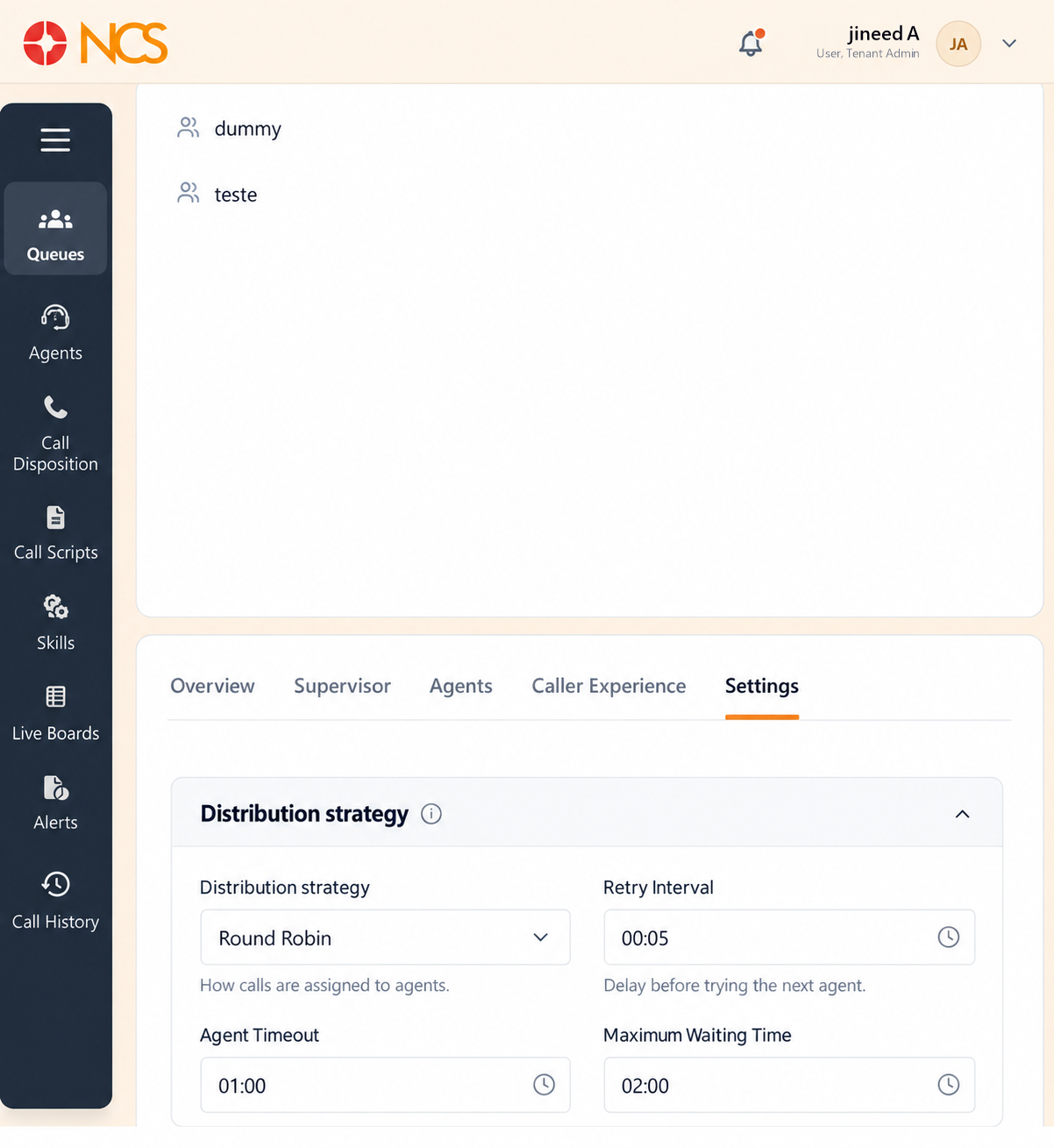
The Tetapan tab holds the queue's operating rules. It is the longest screen in the module, with seven sections and a single Save at the bottom. Change one section at a time and observe the effect before moving on.
- Open the queue and select Tetapan.
- Work through the sections below.
- Pilih Save.
Distribution strategy
How calls are handed to agents.
| Control | Lalai | What it sets |
|---|---|---|
| Distribution strategy | Round Robin | "How calls are assigned to agents." Options: Round Robin, Least calls, Priority, Simultaneous. |
| Retry Interval | "Delay before trying the next agent." | |
| Ejen Timeout | "Ring time per agent." | |
| Maximum Waiting Time | "Longest queue wait time." | |
| Maximum Panggilaners in Queue | "Queue capacity limit." | |
| Timeout | "Queue timeout duration." |
Pick the distribution strategy for the outcome you are managing. Round Robin spreads volume evenly and is the safe default. Least calls equalises workload over a shift rather than per call, which suits teams where handling times vary a lot. Priority respects the Priority value on the Ejen tab (SUP 1.4). Simultaneous rings everyone and answers fastest, at the cost of agents repeatedly grabbing for the same call.
Ejen Tetapan
Ejen Announcement, what the agent hears when a call is delivered; Ejen Auto Pause, whether an agent is paused automatically after missed calls; and Ejen auto pause missed call threshold, the number of misses that triggers it.
Capacity & limits
| Control | What it sets |
|---|---|
| Maximum Panggilaners in Queue | "Maximum queue size." |
| Maximum Waiting Time | "Longest allowed wait time." |
| Drop Threshold | "Remove calls after this wait time." |
| Overall call timeout | "Maximum queue duration per call." |
| Leave queue when empty (no agents logged in) | Described as "Panggilaner follows the overflow chain instead of waiting". |
| Allow caller to join when queue is empty | Described as "Off, caller hits overflow immediately when zero agents". |
SLA
SLA Time, "Target answer time for queued calls." Evaluation Interval, "Period used to measure SLA performance." Alarm Threshold, "Trigger an alert when SLA falls below target" (see SUP 7).
Wrap-up & dispositions
Wrap-up time, "Time allowed after a call ends." Auto-disposition timeout, "Automatically apply a disposition after this time." Lalai disposition, "Disposition applied by default", defaulting to PanggilanKembali with the options PanggilanKembali, Resolved, Voicemail, Follow-up and No Answer.
Break Management
Auto End Break, "Automatically return the agent to Available status when the allotted duration is reached." Beneath it, each break type has three fields:
| Medan | What it sets |
|---|---|
| Break Nama | "Visible to agents during break selection." |
| Category | "Used for compliance and reporting." Options: Custom, Personal, Meal, Training, Compliance. |
| Duration | "Allowed break duration before timeout." |
Pilih Add Break to add another break type.
Set Category correctly, not conveniently. The field's own description says it is used for compliance and reporting. A meal break filed as Custom disappears from any report that distinguishes paid from unpaid time, and in several jurisdictions that distinction is the one a labour inspection asks about.
Compliance & audit
Four controls:
- Suppress recording for calls flagged 'do not record', described as "HIPAA / GDPR caller request".
- Auto-redact credit-card numbers from transcripts, "Automatically mask credit card numbers in call transcripts."
- Log every supervisor force-action to audit trail.
- Audit log available to compliance officer.
Set compliance controls early. Set the compliance controls in the same session as the queue's phone number, not later. Credit-card redaction and do-not-record handling only protect the calls taken after you enable them. A queue that took payments for a week before redaction was switched on has a week of recordings containing card data, and no setting on this page removes it retrospectively.
Set a Lalai disposition even if you expect agents to always choose one. Without it, a call the agent forgets to dispose of is reported as no outcome, which is indistinguishable in a report from a call that never happened.
Change capacity controls carefully. Maximum Panggilaners in Queue, Maximum Waiting Time and Drop Threshold are the three controls that decide when a real customer is refused or dropped. Change them one at a time, note the previous value before you change it, and watch the Live Wallboard (SUP 6.3) through a busy period afterwards.
Figure key, Queue Tetapan
- Tetapan tab, selected.
- Distribution strategy section, with Distribution strategy, Retry Interval, Ejen Timeout, Maximum Waiting Time, Maximum Panggilaners in Queue and Timeout.
- Ejen Tetapan section, with Ejen Announcement, Ejen Auto Pause and the missed-call threshold.
- Capacity & limits section, with Maximum Panggilaners in Queue, Maximum Waiting Time, Drop Threshold, Overall call timeout, and the two empty-queue behaviours. Note the two field names repeated from item 2.
- SLA section, with SLA Time, Evaluation Interval and Alarm Threshold.
- Wrap-up & dispositions section, with Wrap-up time, Auto-disposition timeout and Lalai disposition.
- Break Management section, with Auto End Break and the Break Nama, Category and Duration of each break, plus Add Break.
- Compliance & audit section, with the four controls.
- **Butang Simpan.