2.10 Edit a user, Gambaran Keseluruhan tab
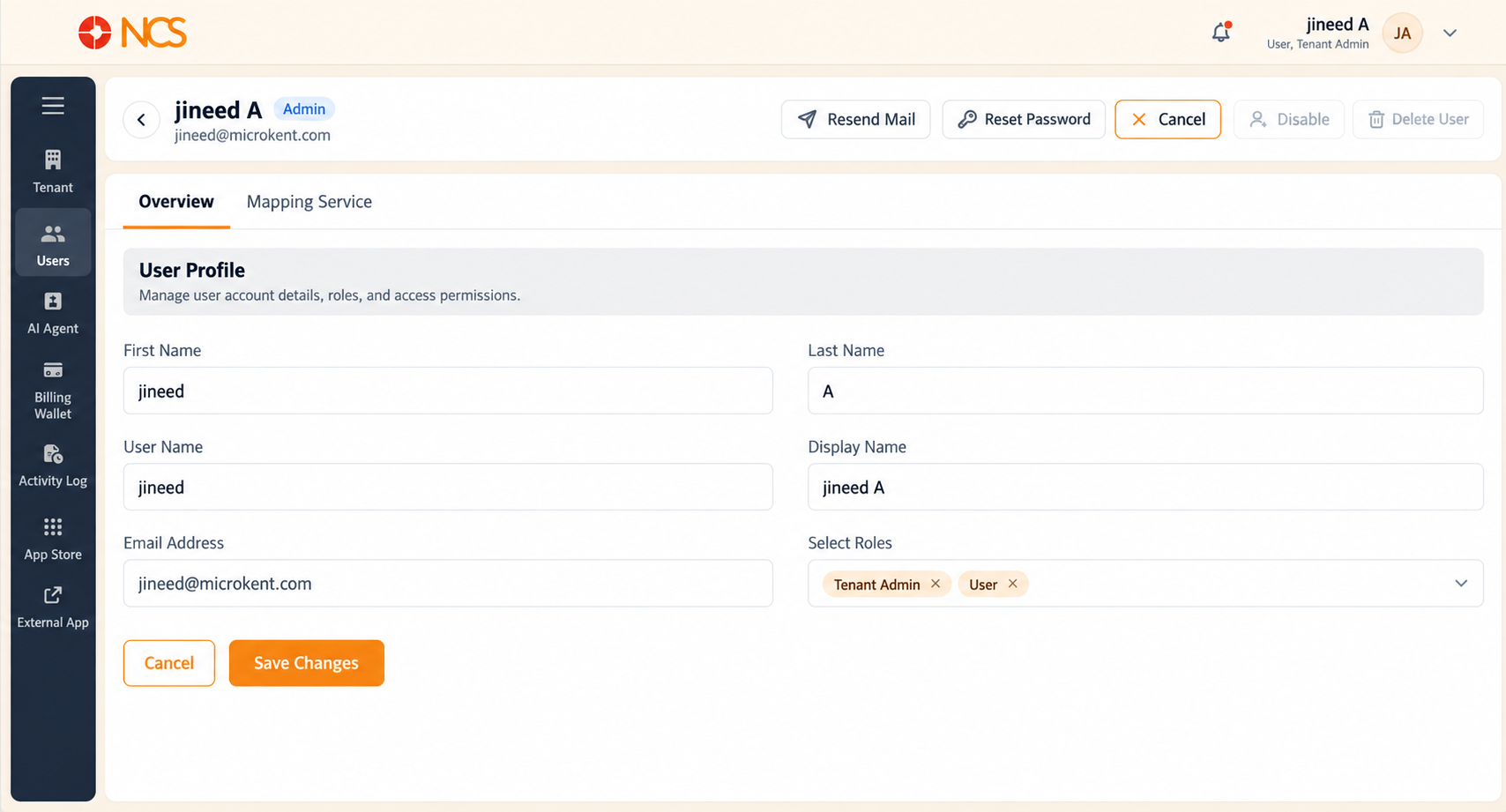
Selecting the pencil icon (Edit) on a user's row opens that user's record. The page has two tabs, Gambaran Keseluruhan and Mapping Service, and a row of quick actions at the top right.
Navigation on this page:
- The back arrow (
<) at the top left returns you to the Pengguna list. - Gambaran Keseluruhan holds the user's identity and roles.
- Mapping Service holds their telephony credentials (see 2.11).
Quick actions at the top right, five controls: Resend Mail, Reset Kata Laluan, Batal, Disable, Delete Pengguna. These are the same operations as the Pengguna list row actions, under the Edit Pengguna page's own names: Resend Mail is Resend Email, Reset Kata Laluan is Change Kata Laluan, and Delete Pengguna is Delete.
Medan on the Gambaran Keseluruhan tab:
| Medan | Editable |
|---|---|
| First Nama | Yes. |
| Last Nama | Yes. |
| Pengguna Nama | No. Read-only. The login identifier is fixed once the account is created. |
| Display Nama | Yes. This is the name shown across the platform and in the Pengguna list. |
| Email Address | No. Read-only. To change a user's email address, contact support@ncsapp.com. |
| Pilih Roles | Yes. Pilih the dropdown to add a role, or the x on a role tag to remove it. The two roles are Penyewa Admin and Pengguna (see 2.3). |
Saving - Pilih Save Changes at the bottom of the form to apply your edits. Two Batal buttons. This page has a Batal in the top-right quick actions and a Batal at the bottom of the form beside Save Changes. Both leave without applying your edits. Use the one at the bottom of the form as the counterpart to Save Changes when you decide against a change you have typed, and treat the top-right Batal as the page-level exit.
Figure key, Edit Pengguna, Gambaran Keseluruhan tab
- Kembali arrow (
<), top left, returns to the Pengguna list. - Gambaran Keseluruhan tab, selected.
- Mapping Service tab.
- Resend Mail quick action, top right.
- Reset Kata Laluan quick action.
- Batal quick action.
- Disable quick action.
- Delete Pengguna quick action.
- First Nama field.
- Last Nama field.
- Pengguna Nama field, read-only.
- Display Nama field.
- Email Address field, read-only.
- Pilih Roles field, with role tags, each tag's x, and the dropdown arrow.
- Batal button, bottom of the form.
- **Butang Simpan Perubahan.