6.1 Browse and install an application
Penyewa > Kedai Aplikasi lists the integrations available to your tenant and the ones already installed. Installing or removing an application changes tenant-wide integration behaviour, so agree each change with the owner of the target system first.
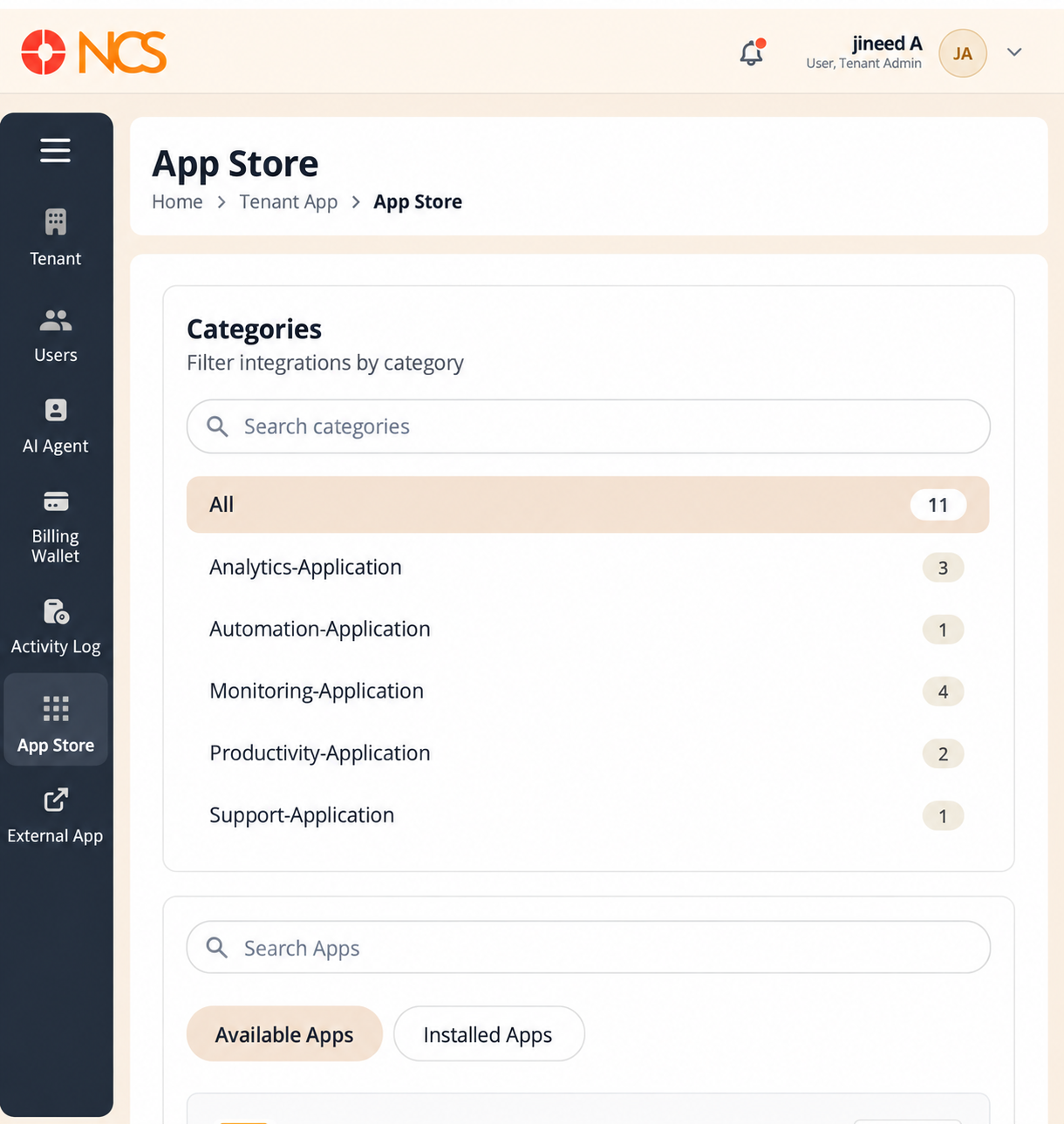
- Open Penyewa > Kedai Aplikasi.
- Pilih the Available Apps tab.
- Narrow the list either by category or by name:
- Use Cari categories to find a category, or select a category directly.
- Masukkan application name in Cari Apps.
- Read the application's description.
- Pilih Install.
Categories - The interface names its categories with an -Application suffix, and shows a count beside each:
| Category as displayed | Count |
|---|---|
| All | 11 |
| Analytics-Application | 3 |
| Automation-Application | 1 |
| Monitoring-Application | 4 |
| Productivity-Application | 2 |
| Support-Application | 1 |
The counts are what your tenant has available. The All count includes applications already installed as well as those still available, so All is larger than the number of tiles on the Available Apps tab. Your counts change as you install applications.
The application catalogue. Ten integrations are available -
| Application | Category |
|---|---|
| Google Calender | Productivity |
| Zendesk | Support |
| Zabbix | Monitoring |
| Jenkins | Automation |
| Grafana | Monitoring |
| Datadog | Monitoring |
| Kibana | Monitoring |
| Power BI | Analytics |
| Tableau | Analytics |
| Splunk | Analytics |
The calendar integration is spelled Google Calender in the interface. Cari for it with that spelling. The intended name is Google Calendar.
Figure key, Available Apps
- Jejak Navigasi.
- Left navigation, with Kedai Aplikasi selected.
- Available Apps tab, selected.
- Installed Apps tab.
- Cari categories field.
- Category list, each entry with its count: All, Analytics-Application, Automation-Application, Monitoring-Application, Productivity-Application, Support-Application.
- Cari Apps field.
- Application tile, showing the application name.
- Application description on the tile.
- Install button on the tile.