7.2 Connect an external application
- Open Locataire > Application externe.
- Sélectionnez Connect Application externelication.
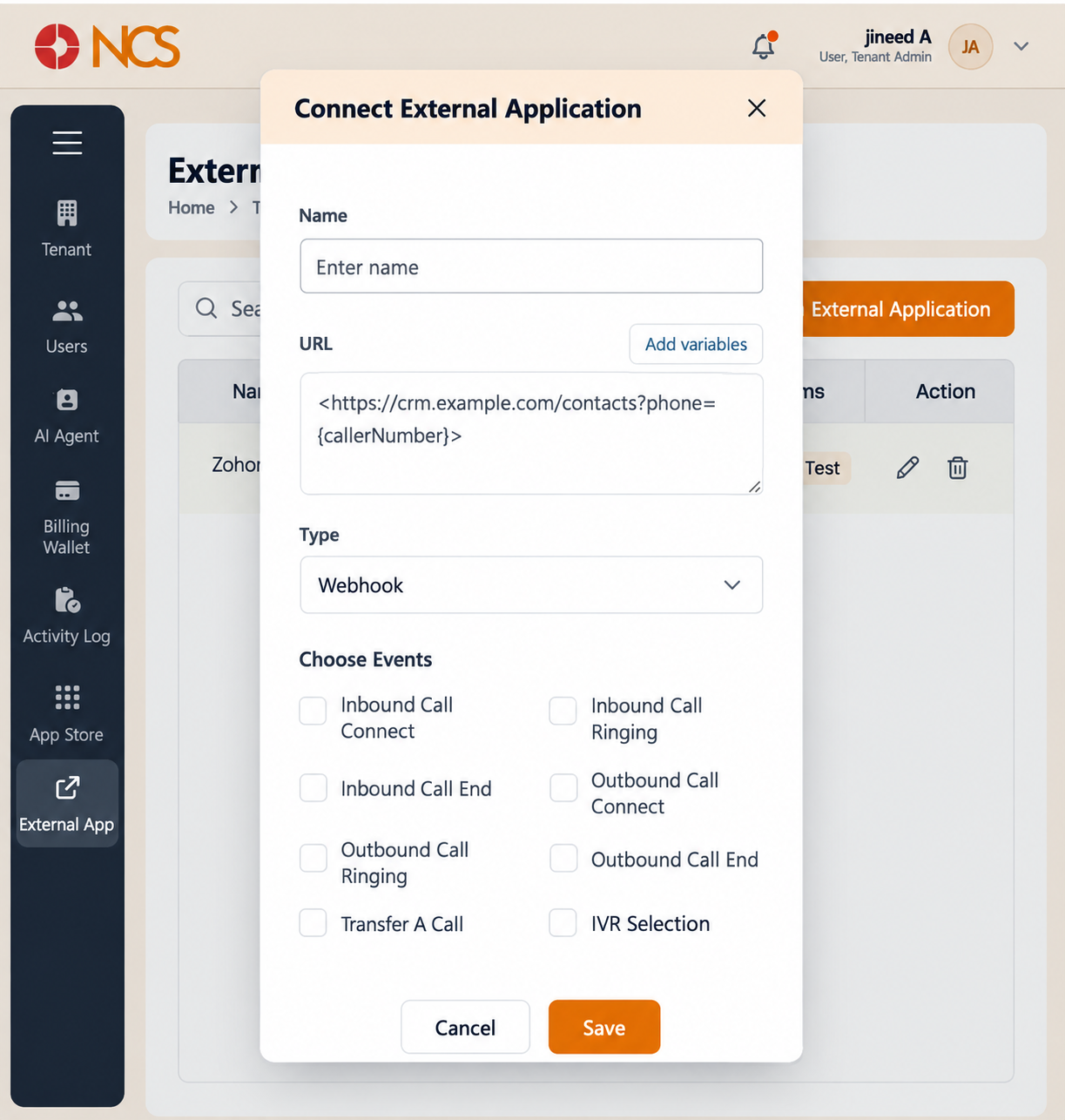
- Enter a descriptive Nom. Nom it for the system and the event, for example CRM screen pop, inbound connect, so the list stays readable.
- Saisissez le destination URL. The field's own placeholder shows a worked example in the form
https://crm.example.com/contacts?phone={callerNuméros}, which is the pattern to follow: your endpoint, plus the call data it needs as variables. Insert the variables with Add variables rather than typing them (see 7.3). - Review Type. The connection type is Webhook.
- Under Choisissez Events, select the events that should call your URL. Eight events are available:
| Event | Fires when |
|---|---|
| Inbound Appel Connect | An inbound call is answered and connected. |
| Inbound Appel Ringing | An inbound call starts ringing, before it is answered. |
| Inbound Appel End | An inbound call ends. |
| Outbound Appel Connect | An outbound call is answered and connected. |
| Outbound Appel Ringing | An outbound call starts ringing. |
| Outbound Appel End | An outbound call ends. |
| Transfer A Appel | A call is transferred. |
| SVI (SVI (IVR)) Selection | A caller makes an SVI (SVI (IVR)) selection. |
- Sélectionnez Save to create the connection, or Annuler to discard it.
Choisissez the event to match what the receiving system should do. A screen pop that must appear before the agent picks up needs Inbound Appel Ringing; one that should appear only on a connected call needs Inbound Appel Connect. A wrap-up or logging call needs Inbound Appel End or Outbound Appel End. Selecting the wrong event does not produce an error: the integration simply never fires, or fires at the wrong moment, which is why this list matters more than it looks. Sélectionnez more than one event where the receiving system expects to be told about each stage.
Figure key, Connect Application externelication form
- Titre du formulaire, Connect Application externelication.
- Nom field.
- URL field, with its worked-example placeholder.
- Add variables control (see 7.3).
- Type, showing Webhook.
- Choisissez Events section heading.
- The eight event checkboxes: Inbound Appel Connect, Inbound Appel Ringing, Inbound Appel End, Outbound Appel Connect, Outbound Appel Ringing, Outbound Appel End, Transfer A Appel, SVI (SVI (IVR)) Selection.
- Annuler button.
- **Bouton Enregistrer.