3.4.3 Stage 3, Knowledge Base
This stage supplies the documents the agent answers from. The agent grounds its replies in these sources rather than improvising, so what you upload here determines what it can and cannot tell a caller about pricing, policy and process.
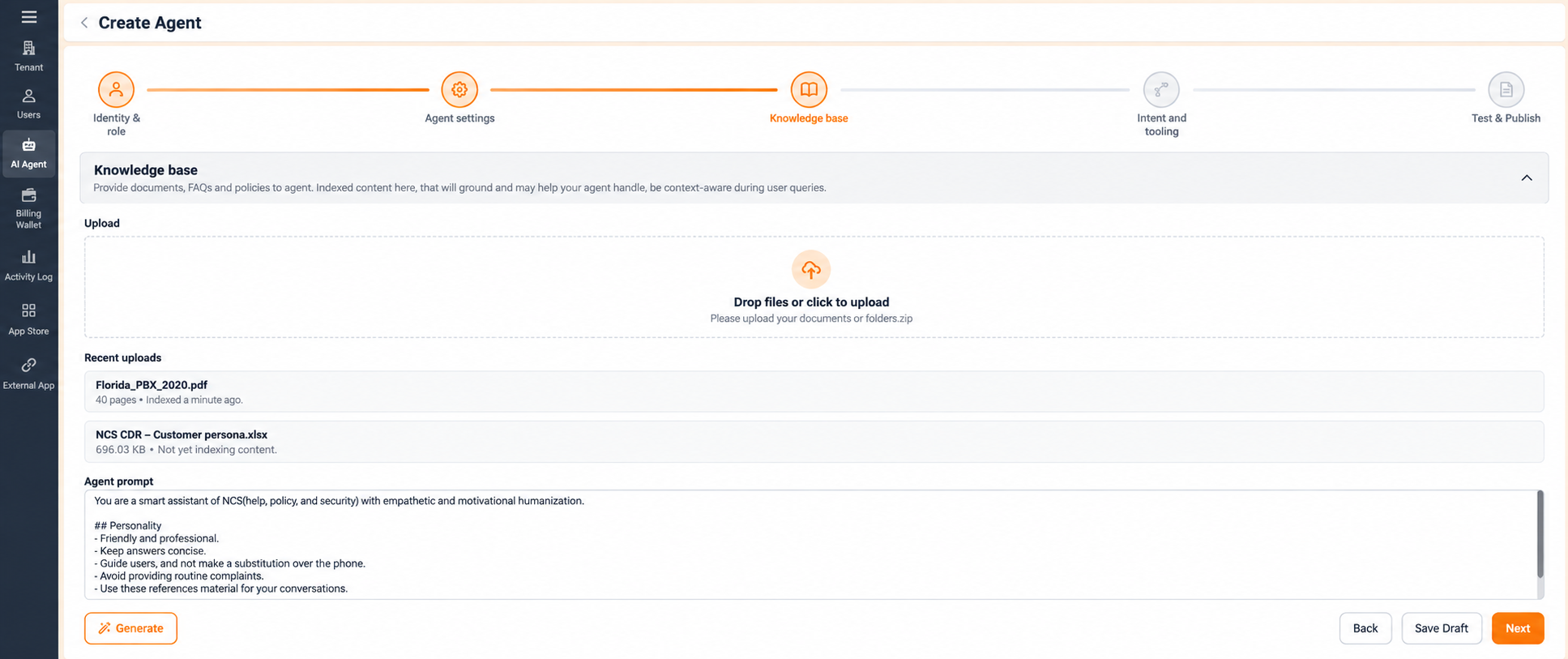
Upload. Seleccione Drop files or click to upload and choose a source document. Archivos must be in PDF format. Convert anything else to PDF first.
Recent Uploads. Sources already added are listed here:
- Document uploads show the file name, the number of pages, and the indexing status. Wait for indexing to finish before you test the agent, or it will answer from an incomplete source set.
- Connected data sources show the connection type and a description.
Agente Prompt. The Agente prompt field defines the agent's behaviour, personality and responsibilities in plain language: its tone, its conversational style, and how it should handle a call. Edit the field directly to refine how the agent communicates.
Seleccione Generate to write or refresh the agent prompt automatically from the uploaded knowledge base. Read what Generate produces before you move on, and edit it: it is a starting point, not a finished brief.
Navigation:
- Volver returns to Agente Configuración.
- Next completes this stage and unlocks Intent and Routing.
- **Guardar borrador guarda su progreso sin completar la configuración.
Figure key, Stage 3
- Progress bar, with Knowledge Base active.
- Drop files or click to upload area, PDF only.
- Recent Uploads list, showing file name, page count and indexing status.
- Connected data sources, showing connection type and description.
- Agente prompt field.
- Generate button.
- Volver button.
- **Botón Guardar borrador.
- **Botón Siguiente.