SUP 2.2 Add an agent to a queue
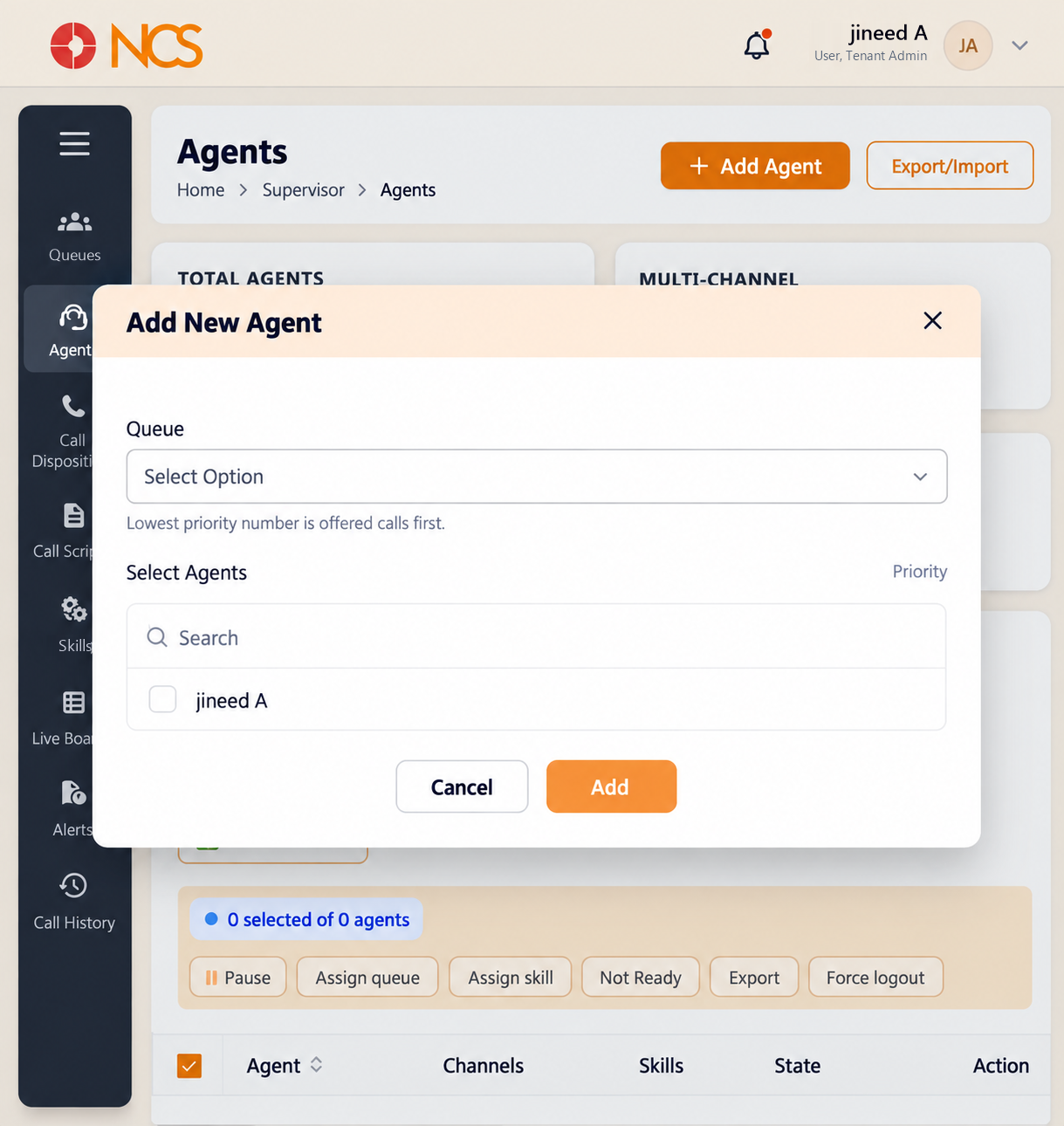
Add Agent opens the Add New Agent dialogue.
- Open Supervisor > Agents.
- Select Add Agent.
- Select the Queue (Select Option).
- Use Search under Select Agents, and select the checkbox for each agent to add. The picker lists the tenant's agents by name.
- Set Priority. The form states the rule itself: "Lowest priority number is offered calls first."
- Select Add, or Cancel.
This form assigns existing agents to a queue. It does not create a person. An agent must already exist as a tenant user with telephony mapped (see 2.6 and 2.11 in the Tenant module draft) before they appear in Select Agents.
Assign in tiers rather than all at priority 1. Put your primary team at priority 1 and your overflow or cross-trained staff at a higher number. Every agent at the same priority means every phone rings on every call, which trains people to ignore it.
Figure key, Add New Agent form
- Form title.
- Queue selector.
- Select Agents section, with its Search field.
- Agent checkboxes.
- Priority field, with its lowest-number-first note.
- Cancel button.
- Add button.